 f959b53cac
Restructured for clarity: table of contents, prerequisites table,
quick start section, and embedded screenshot showing actual search
results. Title now clearly states Gemini Embedding 2 + Claude Code.
6.7 KiB
Multimodal RAG with Gemini Embedding 2 and Claude Code
Search across PDFs, images, and documents using plain English. No coding required. Claude Code builds everything from prompts.
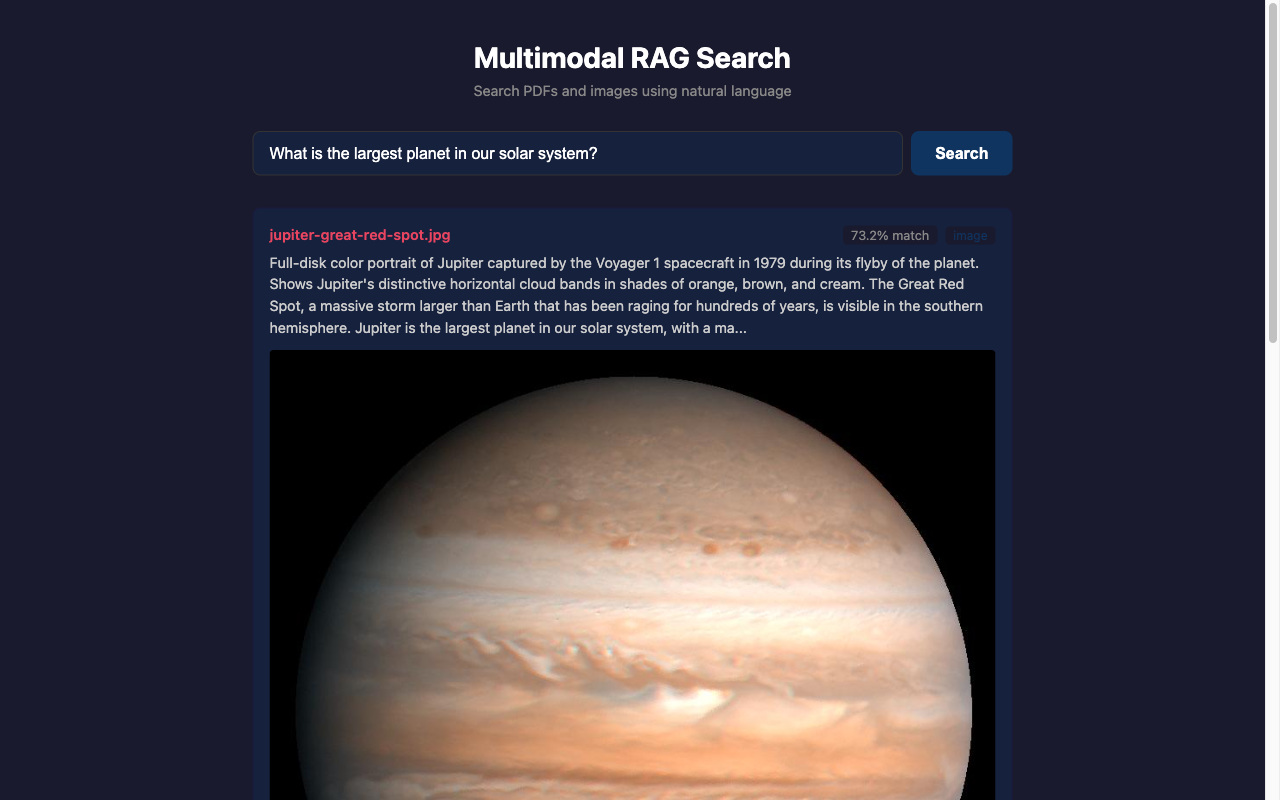
Gemini Embedding 2 converts text, images, and video into the same searchable space. Claude Code builds the app. Pinecone stores the vectors. You just copy four prompts.
Table of Contents
- Quick Start
- What This Does
- Prerequisites
- Step-by-Step Guide
- Example Data
- Why Image Descriptions Matter
- Costs
- Troubleshooting
- How It Works
- License
Quick Start
git clone https://git.thedharmalab.com/ktg/multimodal-rag-guide.git
cd multimodal-rag-guide
claude
Then paste the prompt from prompts/01-setup.md into Claude Code.
Four prompts, 30 minutes, working multimodal search.
What This Does
One search box that understands PDFs, images, and text at the same time.
Ask "What is the largest planet in our solar system?" and the system returns the Jupiter fact sheet from a PDF, the Voyager photograph of the Great Red Spot from a JPG, and a confidence score for each result. One question, multiple formats, ranked by meaning.
This is called Retrieval-Augmented Generation (RAG). Google's Gemini Embedding 2 handles the multimodal part: it converts different content types into the same numerical format so they become searchable together. Claude Code handles the building part: it reads your prompts and writes all the code. You handle neither.
Prerequisites
| Requirement | Cost | What it does |
|---|---|---|
| Claude Code | Part of Claude Pro ($20/mo) or Max | Builds the app and answers questions |
| Google AI Studio | Free tier | Gemini Embedding 2 API key |
| Pinecone | Free tier | Vector database for storing embeddings |
No programming knowledge required.
Step-by-Step Guide
Step 0: Get your API keys (10 minutes)
Google AI Studio (for Gemini Embedding 2):
- Go to aistudio.google.com
- Sign in with a Google account
- Click "Get API key" in the left sidebar
- Click "Create API key" and copy it
Pinecone (for the vector database):
- Go to pinecone.io and create a free account
- In the dashboard, click "Create Index"
- Name it
space-search, set dimensions to3072, choosecosinemetric - Select the free "Starter" plan
- Copy your API key from "API Keys"
Step 1: Clone and start Claude Code (5 minutes)
git clone https://git.thedharmalab.com/ktg/multimodal-rag-guide.git
cd multimodal-rag-guide
claude
Paste the prompt from prompts/01-setup.md.
Claude Code creates the project structure and installs dependencies.
When done, copy env.template to .env and fill in your API keys.
Step 2: Ingest your files (10 minutes)
Paste the prompt from prompts/02-ingest.md.
Claude Code reads each file, splits it into chunks, generates embeddings via Gemini Embedding 2, and stores everything in Pinecone.
Step 3: Search (5 minutes)
Paste the prompt from prompts/03-search.md.
Claude Code builds a web interface. Open http://localhost:3333
in your browser and try these searches:
| Query | Expected results |
|---|---|
| "What is the largest planet?" | Jupiter fact sheet + Jupiter image |
| "First Moon landing" | Aldrin image + solar system overview |
| "Which moon has volcanoes?" | Moons PDF mentioning Io |
| "How far is Jupiter from Earth?" | Jupiter fact sheet with exact distance |
A single question pulls results from both PDFs and images.
Step 4: Make it your own
Replace the NASA example files with your own content:
- Add PDFs, images, or documents to
example-data/ - Write descriptions for images (see
example-data/descriptions.md) - Paste
prompts/04-improve.mdto re-index
Ideas: company documents, research papers, travel photos, recipe collections, course notes.
Example Data
The example-data/ folder contains NASA public domain files
(no copyright restrictions):
| File | Description |
|---|---|
solar-system-overview.pdf |
Overview of our solar system |
jupiter-fact-sheet.pdf |
Detailed data about Jupiter |
solar-system-moons.pdf |
Guide to planetary moons |
earthrise.jpg |
Earth from lunar orbit, Apollo 8 (1968) |
aldrin-moon.jpg |
Buzz Aldrin on the Moon, Apollo 11 (1969) |
jupiter-great-red-spot.jpg |
Jupiter by Voyager 1 (1979) |
iss-over-earth.jpg |
The Moon seen from the ISS |
descriptions.md |
Image descriptions for search quality |
Why Image Descriptions Matter
The search system finds images through their text descriptions, not by "seeing" them. A description like "Photo of a planet" only matches searches containing those exact concepts. A description like "Full-disk portrait of Jupiter captured by Voyager 1 in 1979, showing horizontal cloud bands and the Great Red Spot" matches searches about Jupiter, Voyager missions, storms, and cloud patterns.
See example-data/descriptions.md
for side-by-side examples.
Costs
$0 extra if you already have a Claude subscription. Both Gemini Embedding 2 and Pinecone have free tiers that cover this guide and well beyond.
See costs.md for the full breakdown.
Troubleshooting
See troubleshooting.md for the 10 most common problems. The most effective fix for almost anything: copy the exact error message and paste it into Claude Code.
How It Works
Your files --> Chunking --> Gemini Embedding 2 --> Pinecone (vector DB)
                                                        |
Your question --> Gemini Embedding 2 --> Search --> Claude answers
Gemini Embedding 2 converts all content types (text, images, video, audio) into numerical vectors in one shared space. Pinecone stores and searches those vectors. Claude reads the matching content and generates answers.
For plain-English explanations of embeddings, vector databases, RAG, and chunking, see concepts.md.
Built With
- Claude Code by Anthropic
- Gemini Embedding 2 by Google
- Pinecone
License
Part of The Dharma Lab. Read the full article for the story behind this project.